How to Deprovision an Entra Synced Client from LastPass
Estimated Reading Time: 1 Minutes|
# |
Instructions |
Details |
|
1 |
Deprovision all users from the LastPass Group in Entra by removing them from the LastPass group. |
After it syncs, you can remove the 2 Application registrations and the LastPass Security Group |
|
2 |
Make sure the users have all their passwords, they will not be able to get them once the account is removed. Get this in writing (email). |
Make sure you make clear that they will not be able to recover anything once it’s removed. And they email back that they understand and have everything. |
|
3 |
Delete all users except one; this user must be an admin, so make them an admin before proceeding. From the Users menu, go to Admin Levels > Assign users, then select the last user to make them an admin. |
|
|
4 |
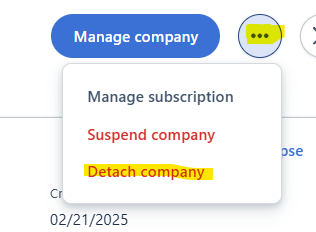
Go to Company List and select the Company Name so it appears in the right-side panel. Click the three dots next to Manage company and select Detach Company |
|
|
5 |
Open a support ticket and ask them to delete the account |
You will no longer see the company in your list, but support has to remove them so they are removed from billing. |